

Last Updated on August 20, 2026
Marketing automation sounds like something only big companies with big budgets do. It isn’t. At its simplest, it means setting up systems that do repetitive marketing tasks for you, so you can focus on the parts of your business that actually need a human.
This guide covers what marketing automation looks like for UK small businesses, what to automate first, which tools to use at different budgets, and how to set up your first workflows this week. No enterprise jargon, no expensive software pitches.
What marketing automation actually means for small businesses
Forget the corporate definition. For a small business, marketing automation means this: you set something up once, and it runs on its own from that point forward.
When someone signs up for your newsletter, they automatically get a welcome email. When a lead fills in a contact form, they automatically get a follow-up sequence. When a customer buys something, they automatically get a review request five days later.
None of this requires you to remember, to be at your desk, or to do anything manually. The system handles it while you’re doing actual work.
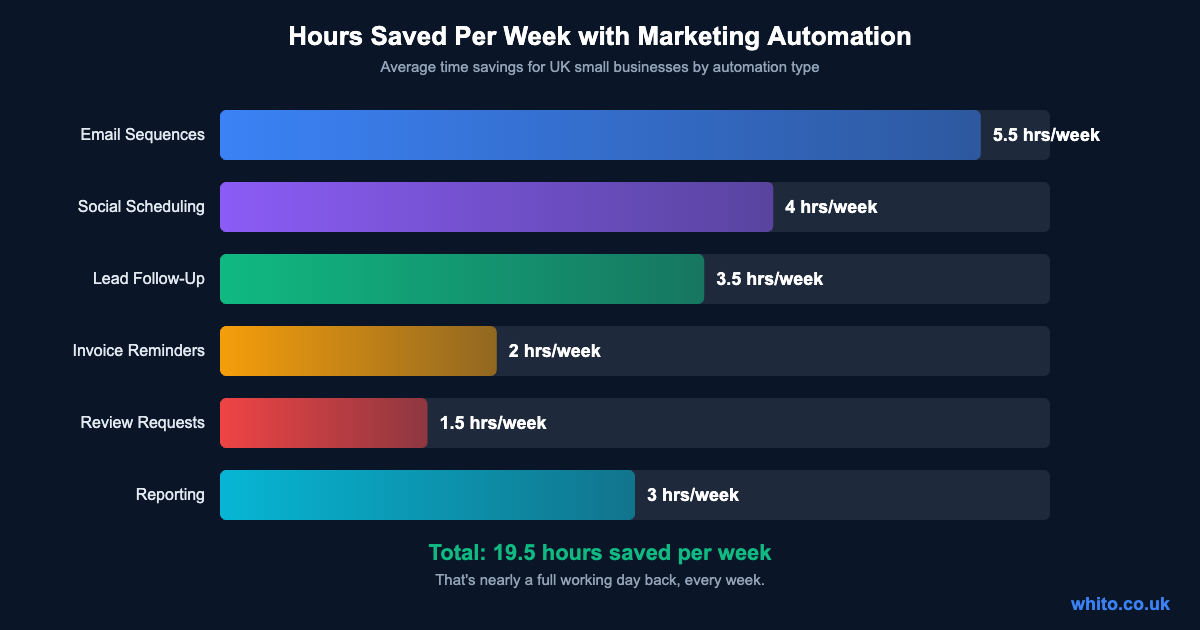
The difference between a business that automates and one that doesn’t is usually about 15-20 hours a week in manual tasks. That’s not a guess. Here’s what the data shows.
How much time automation actually saves
Most small business owners spend their time on tasks that a simple automation could handle. Email follow-ups, social media posting, lead chasing, review requests, basic reporting. Added up, it’s nearly a full working day every week.
The goal isn’t to automate everything. It’s to automate the repetitive stuff so you can spend more time on the things that actually grow your business: talking to customers, improving your product, and making decisions that need a brain behind them.
The four stages of marketing automation
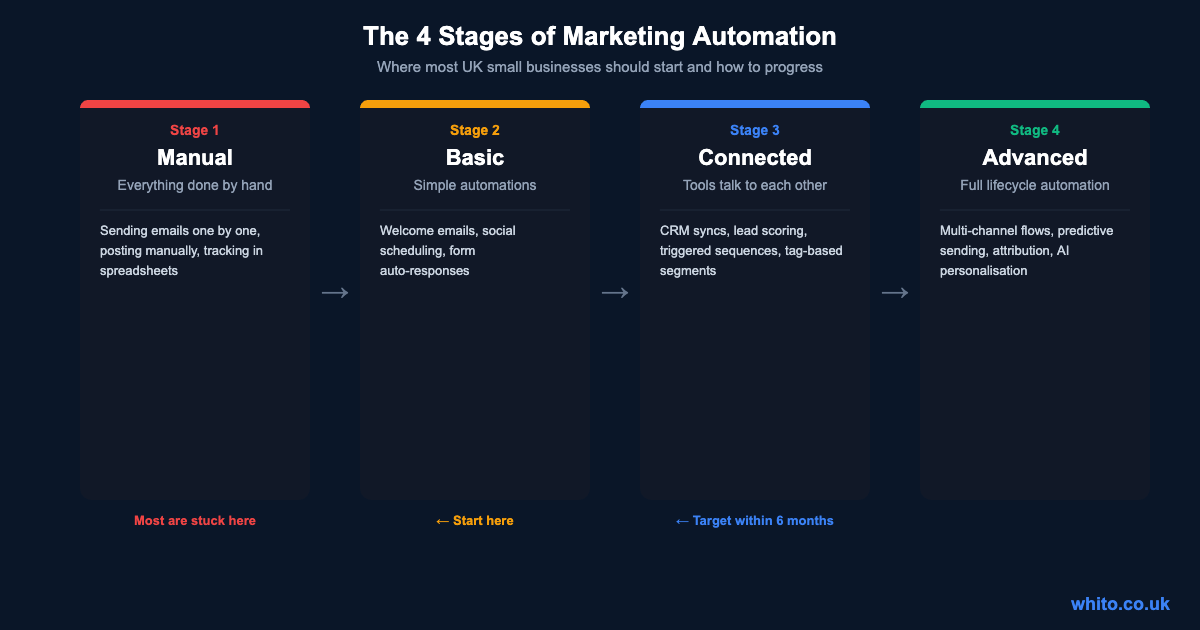
Most UK small businesses are stuck at Stage 1, doing everything manually. The realistic target is to reach Stage 2 or 3 within six months. Stage 4 is where agencies and larger businesses operate.
| Stage | What It Looks Like | Tools Needed | Monthly Cost |
|---|---|---|---|
| 1. Manual | Everything done by hand, one at a time | Spreadsheets, Gmail | £0 |
| 2. Basic | Simple automations: welcome emails, social scheduling | MailerLite, Buffer | £15-30 |
| 3. Connected | Tools sync, triggers fire across platforms | ActiveCampaign, Zapier | £50-100 |
| 4. Advanced | Full lifecycle, multi-channel, AI-assisted | HubSpot, Klaviyo | £100+ |
Don’t try to jump straight to Stage 3. Businesses that do usually overcomplicate things, waste money on tools they don’t need, and end up back at Stage 1 within three months. Start at Stage 2, get it working, then build from there.
What to automate first
The biggest mistake is trying to automate everything at once. Start with the three workflows that deliver the most impact for the least effort.
Your first three automations
1. Welcome Email Sequence
Trigger: Someone signs up for your list or downloads a lead magnet.
What happens: They get 3-5 emails over 10 days introducing your business, sharing your best content, and making an offer.
Why first: This runs 24/7 and converts cold subscribers into warm leads while you sleep.
2. Lead Follow-Up
Trigger: Someone fills in a contact form or requests a quote.
What happens: They immediately get a confirmation email, then a follow-up 24 hours later if you haven’t responded, then a “still interested?” email after 3 days.
Why second: Most businesses lose leads because they’re too slow to respond. This buys you time and keeps the conversation alive.
3. Review/Testimonial Requests
Trigger: A job is completed or a product is delivered.
What happens: 5 days later, the customer gets an email asking for a Google review with a direct link.
Why third: Reviews drive local SEO and trust. Most businesses forget to ask. Automation makes it consistent.
These three automations alone can save 10+ hours a week and increase your conversion rate by 20-30%. Set them up before you touch anything else.
The best automation tools for UK small businesses
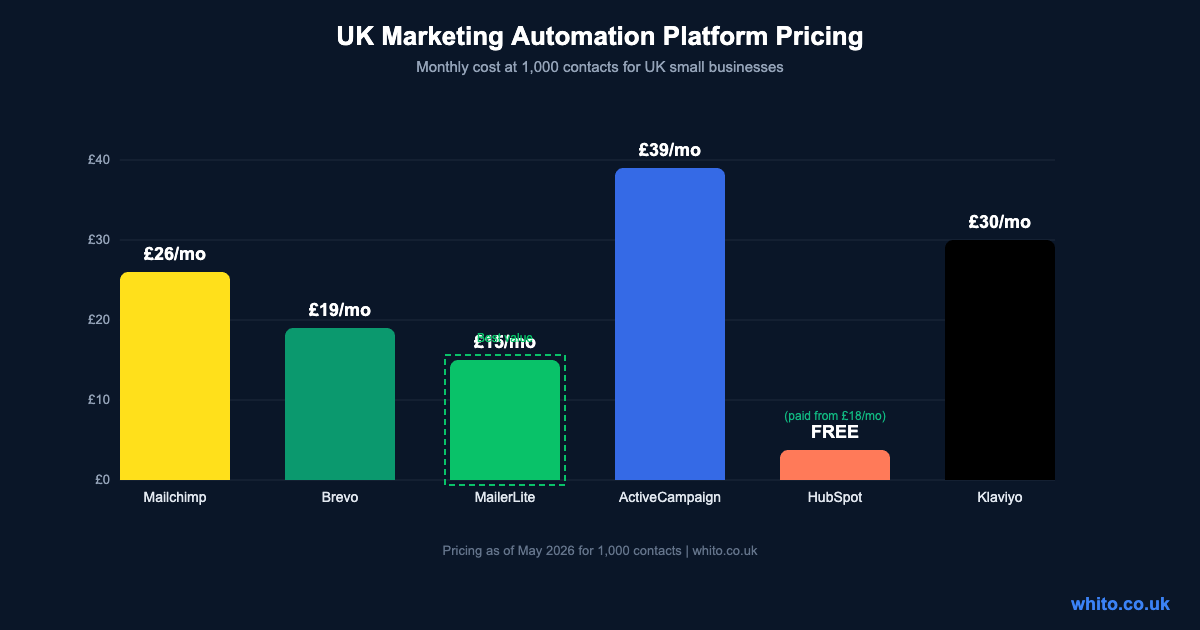
You don’t need expensive software. At the basic level, most email marketing platforms include automation features. Here’s how the main options compare for UK small businesses.
| Platform | Price (1k contacts) | Best For | Automation Quality | UK Notes |
|---|---|---|---|---|
| MailerLite | £15/mo | Beginners, tight budgets | Good | Simple visual builder, free tier available. Great starting point. |
| Brevo (ex-Sendinblue) | £19/mo | Email + SMS + CRM | Good | EU-based, strong on GDPR. Includes SMS marketing. |
| Mailchimp | £26/mo | All-rounders, e-commerce | Strong | Most integrations. Automation on Standard plan and above. |
| Klaviyo | £30/mo | E-commerce (Shopify) | Excellent | Purpose-built for online shops. Deep Shopify integration. |
| ActiveCampaign | £39/mo | Service businesses, B2B | Excellent | Best automation builder. CRM included. Worth the price if you need complex flows. |
| HubSpot | Free / £18+ | Growing teams, CRM-first | Excellent | Free CRM is genuinely useful. Automation on paid tiers. Gets expensive quickly. |
For most UK small businesses starting out, MailerLite or Brevo is the right choice. They’re affordable, have good automation builders, and handle GDPR compliance well. Move to ActiveCampaign or Klaviyo when your needs outgrow the basics.
Using Zapier to connect everything
Most automation platforms handle email well, but the real power comes when your tools talk to each other. That’s where Zapier (or Make, its cheaper alternative) comes in.
Zapier connects over 6,000 apps and lets you create “Zaps”: when X happens in one app, do Y in another. No coding needed. Here are the most useful Zaps for UK small businesses:
| When This Happens | Do This | Why It Matters |
|---|---|---|
| New form submission (website) | Add to email list + send Slack notification | No lead falls through the cracks. Instant team alert. |
| New sale (Shopify/WooCommerce) | Add to post-purchase email sequence | Automated upsell and review request flow. |
| New Google review | Post to Slack + add to testimonials spreadsheet | Stay on top of reviews without checking manually. |
| New blog post published | Auto-share to social media channels | Content promotion on autopilot. |
| Invoice overdue (Xero/QuickBooks) | Send polite reminder email automatically | Get paid faster without awkward conversations. |
| New calendar booking | Send prep email + add to CRM + notify team | Professional experience from the first touchpoint. |
Zapier’s free plan gives you 100 tasks per month, which is enough to test a few automations. Their paid plans start at around £16/month. Make (formerly Integromat) offers a more generous free tier and is often cheaper for higher volumes.
Automation workflows by business type
Different businesses need different automations. Here’s what works best depending on your model.
| Business Type | Top 3 Automations to Set Up | Recommended Tool |
|---|---|---|
| Local Service Business | Booking confirmation, review request, seasonal reminders | Brevo + Zapier |
| E-commerce Shop | Abandoned cart, post-purchase sequence, win-back series | Klaviyo |
| B2B / Consultancy | Lead nurture sequence, proposal follow-up, case study drip | ActiveCampaign |
| Freelancer / Solopreneur | Welcome sequence, invoice reminders, social scheduling | MailerLite + Buffer |
| Restaurant / Cafe | Loyalty rewards, birthday offers, review requests | Brevo (email + SMS) |
Six mistakes that kill marketing automation
Avoid these automation Pitfalls
- Automating before you have a process. If your manual process is messy, automating it just creates automated mess. Fix the workflow first, then automate it.
- Buying expensive tools too early. You don’t need HubSpot at £800/month when MailerLite at £15/month does 90% of what you need. Start cheap, upgrade when you hit real limits.
- Setting and forgetting. Automations need reviewing every quarter. Offers change, links break, and sequences go stale. Put a recurring reminder in your calendar.
- Over-automating customer communication. People can tell when every interaction is automated. Keep the human touch for complex enquiries and complaints. Automate the routine, personalise the exceptions.
- No testing before going live. Always send test emails to yourself. Check every link. Trigger every workflow manually once before letting it run on real contacts.
- Ignoring GDPR. Automated emails still need consent. Every automated message needs an unsubscribe link. Your automations must respect opt-out requests immediately, not “within 24 hours.”
How to measure whether your automations are working
Automation isn’t “set up and hope.” You need to track whether each workflow is actually producing results. Here are the metrics that matter.
| Automation Type | Key Metric | Good Benchmark | If It’s Underperforming |
|---|---|---|---|
| Welcome Sequence | Open rate | 50%+ on email 1 | Improve subject line. Send within 5 mins of signup. |
| Lead Follow-Up | Response rate | 15%+ reply rate | Make emails more personal. Ask a question, don’t just sell. |
| Review Requests | Reviews generated | 10-20% conversion | Simplify the ask. One click to the review page. No hoops. |
| Abandoned Cart | Recovery rate | 5-15% recovered | Send first email within 1 hour. Add urgency or a small discount. |
| Social Scheduling | Engagement rate | 2%+ engagement | Add more variety. Scheduled content can feel robotic if it’s all the same format. |
Review these numbers monthly. If a workflow is underperforming for three months straight, it needs rewriting, not just tweaking.
GDPR and automated marketing in the UK
UK GDPR applies to all automated marketing. The rules are straightforward, but breaking them carries fines of up to £17.5 million or 4% of turnover. Here’s what you need to know.
Consent is required for marketing emails. You need explicit opt-in before adding someone to an automated sequence. Pre-ticked boxes don’t count. Buying email lists and feeding them into your automation is illegal.
Every automated email needs an unsubscribe link. It must work immediately, not “within 7 working days.” Most email platforms handle this automatically, but check your transactional emails too.
You must explain what data you collect and why. Your privacy policy needs to cover automated processing. If you’re using lead scoring or behavioural triggers, mention it.
Right to be forgotten applies to automated systems. If someone asks to be deleted, that includes removing them from all automation workflows, not just unsubscribing them.
The practical advice: use a reputable email platform (they handle most compliance automatically), get proper consent, and keep your unsubscribe process clean. If you do that, you’re covered for 95% of situations.
Getting started this week
Your first week automation plan
Day 1: Sign up for MailerLite or Brevo (both have free tiers). Import your existing email list with proper consent records.
Day 2: Create a simple welcome email sequence: 3 emails over 7 days. Email 1: thanks + who you are. Email 2: your best content or tip. Email 3: your main offer or CTA.
Day 3: Connect your website contact form to your email platform. Every new form submission should trigger the welcome sequence.
Day 4: Set up a lead follow-up automation. When someone requests a quote, they get an instant confirmation, a check-in after 24 hours, and a final nudge after 5 days.
Day 5: Create a review request email. Set it to send automatically 5 days after a job is completed or a product is delivered. Include a direct link to your Google Business Profile.
Day 6-7: Test everything. Sign up using your own email. Submit your own contact form. Trigger each automation manually and check every email arrives correctly.
Total cost: £0-15. Total time: about 4-5 hours. Time saved going forward: 10+ hours every week.
These guides cover the foundations you need before and after automating:
Email Marketing for UK Small Businesses covers how to build your list and write emails that people actually open, which is the foundation every automation sits on.
Facebook and Instagram Ads for UK Small Businesses explains how to generate the leads that your automations will follow up with.
High-Converting Landing Pages shows how to build the pages that capture leads in the first place, feeding your entire automation system.