Last Updated on September 17, 2026
Most UK businesses that try Facebook or Instagram ads lose money. Not because paid social doesn’t work, but because they skip the basics, boost random posts, and hope for the best.
This guide covers what actually matters: how much ads cost in the UK, which formats work for small budgets, how to target properly, and what results to expect at every price point. No fluff, no agency sales pitch. Just the practical stuff.
Why most UK businesses waste money on Facebook Ads
The pattern is almost always the same. A business owner publishes a post, sees it got 12 likes, hits “Boost Post,” spends £50, and wonders why nothing happened.
Boosted posts are not the same as running ads. They give you reach, not results. The targeting is basic, the optimisation is weak, and Meta takes your money regardless of whether anyone actually does anything useful.
The real problems are usually structural. No clear objective. No proper targeting. No landing page. No tracking. And often, no offer worth clicking on in the first place.
Before you spend a penny, you need three things in place: something worth promoting (an offer, a lead magnet, a product), somewhere to send people (a landing page, not your homepage), and a way to track what happens (Meta Pixel installed on your site).
Get those right and even £5 a day can produce real results.
How much do Facebook and Instagram ads cost in the UK?
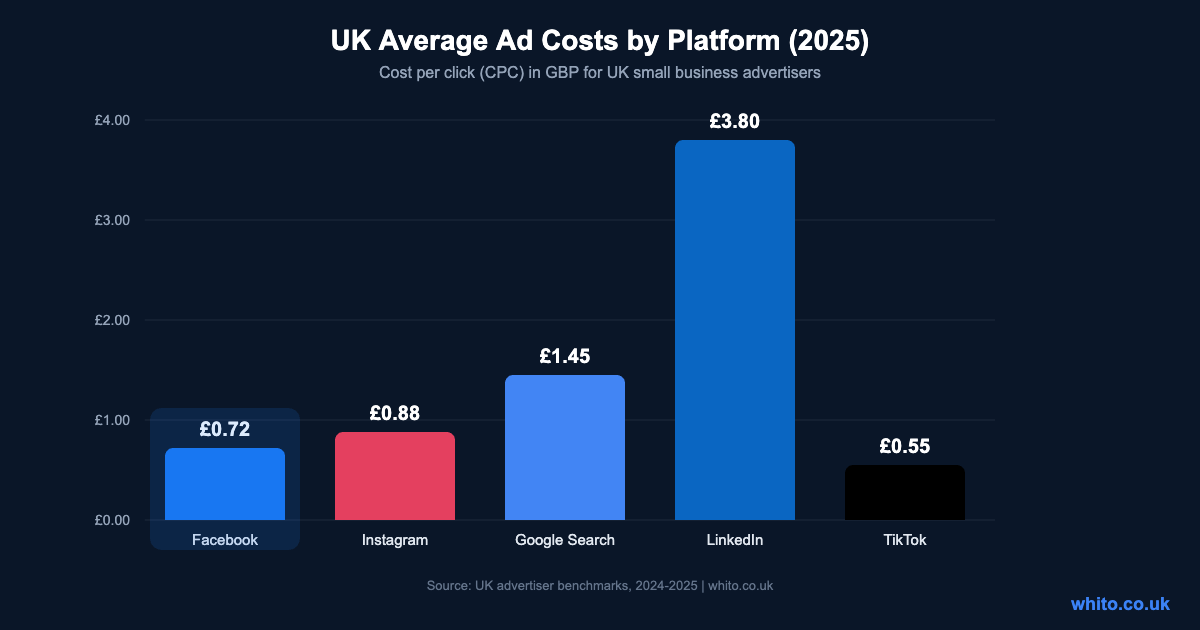
This is the first question every business owner asks, and the answer depends on your industry, audience, and what you’re asking people to do. But here are the UK averages to give you a baseline.
Facebook and Instagram are run through the same platform (Meta Ads Manager), so your budget covers both. Compared to Google Search ads, they’re significantly cheaper per click. The trade-off is intent: Google catches people actively searching, while Meta catches people scrolling. That means your creative and targeting need to work harder.
| Metric | UK Average | Good Performance | What It Means |
|---|---|---|---|
| CPC (Cost Per Click) | £0.72 | Under £0.50 | What you pay each time someone clicks your ad |
| CPM (Cost Per 1,000 Views) | £8.50 | Under £6.00 | Cost to show your ad 1,000 times |
| CTR (Click-Through Rate) | 1.2% | Above 2.0% | Percentage of people who click after seeing your ad |
| CPL (Cost Per Lead) | £8 – £25 | Under £10 | Cost to get someone to fill in a form or sign up |
| ROAS (Return on Ad Spend) | 2.5x | Above 4x | Revenue generated per £1 spent on ads |
These numbers shift depending on your industry. E-commerce tends to see lower CPCs. B2B and professional services run higher. Local service businesses usually land somewhere in the middle.
Facebook vs Instagram: Which one should you use?
Both platforms run through Meta Ads Manager, and in most cases you should let Meta decide where to show your ads (it optimises automatically). But understanding the differences helps you create better content for each placement.
| Factor | ||
|---|---|---|
| UK Users | 44 million | 32 million |
| Strongest Age Group | 30-65+ | 18-40 |
| Best For | Lead generation, local businesses, events | E-commerce, visual brands, younger audience |
| Content Style | Informative, text-friendly, link-friendly | Visual-first, aesthetic, lifestyle |
| Average CPC | £0.72 | £0.88 |
| Ad Placements | Feed, Marketplace, Right Column, Stories | Feed, Stories, Reels, Explore |
If you sell physical products with strong visuals, Instagram will likely outperform. If you run a local service business targeting people over 35, Facebook is probably your better bet. But let the data decide. Run ads across both platforms for the first two weeks, then check which one delivers cheaper results.
The ad formats that actually work for small budgets
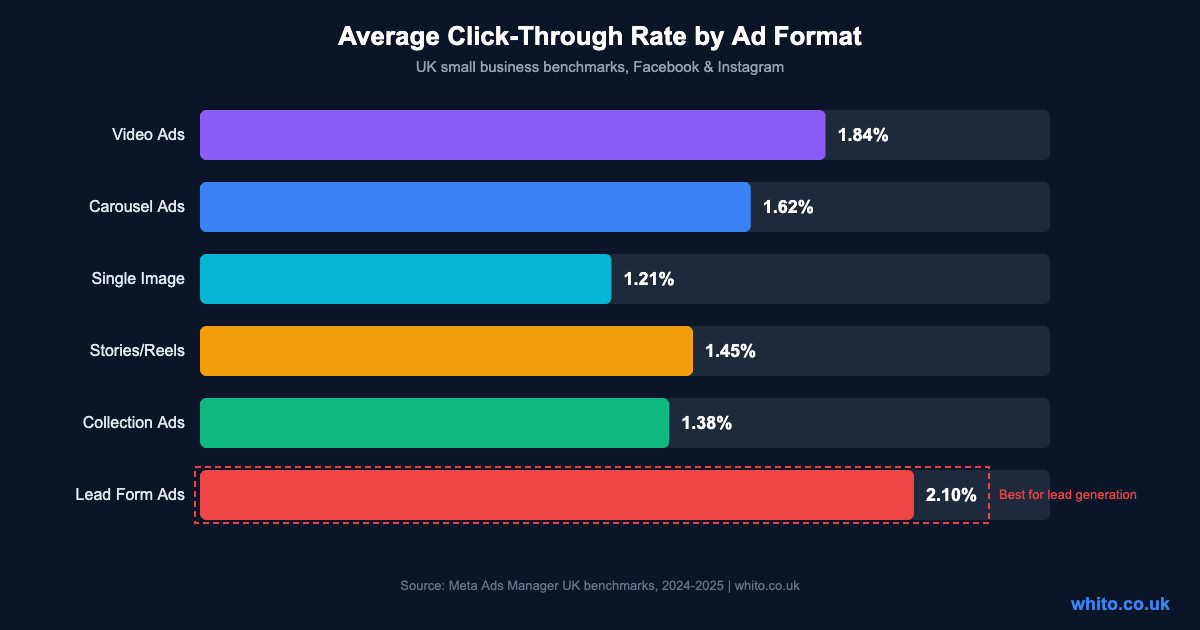
Meta offers a lot of ad formats, but not all of them make sense when you’re spending £300 a month. Here’s what performs best for UK businesses, ranked by click-through rate.
| Ad Format | Best For | Min Budget | Tip |
|---|---|---|---|
| Single Image | Quick promotions, offers | £3/day | Use bright colours and clear text overlay. Keep it simple. |
| Video | Brand awareness, demonstrations | £5/day | First 3 seconds decide everything. Add captions, 80% watch on mute. |
| Carousel | Multiple products, step-by-step | £5/day | Use 3-5 cards. First card must hook, last card must have a CTA. |
| Stories/Reels | Younger audiences, impulse buys | £5/day | Shoot vertical (9:16). Make it feel native, not like an ad. |
| Lead Form | Service businesses, bookings | £5/day | Pre-fills user details from Facebook. Fewer fields = more leads. |
| Collection | E-commerce product catalogues | £10/day | Needs a product catalogue set up first. Great for online shops. |
For most businesses starting out, single image ads and lead form ads are the best combination. Image ads are cheap to create and test. Lead forms capture contact details without sending people to a separate website, which removes friction.
What to expect at every budget level
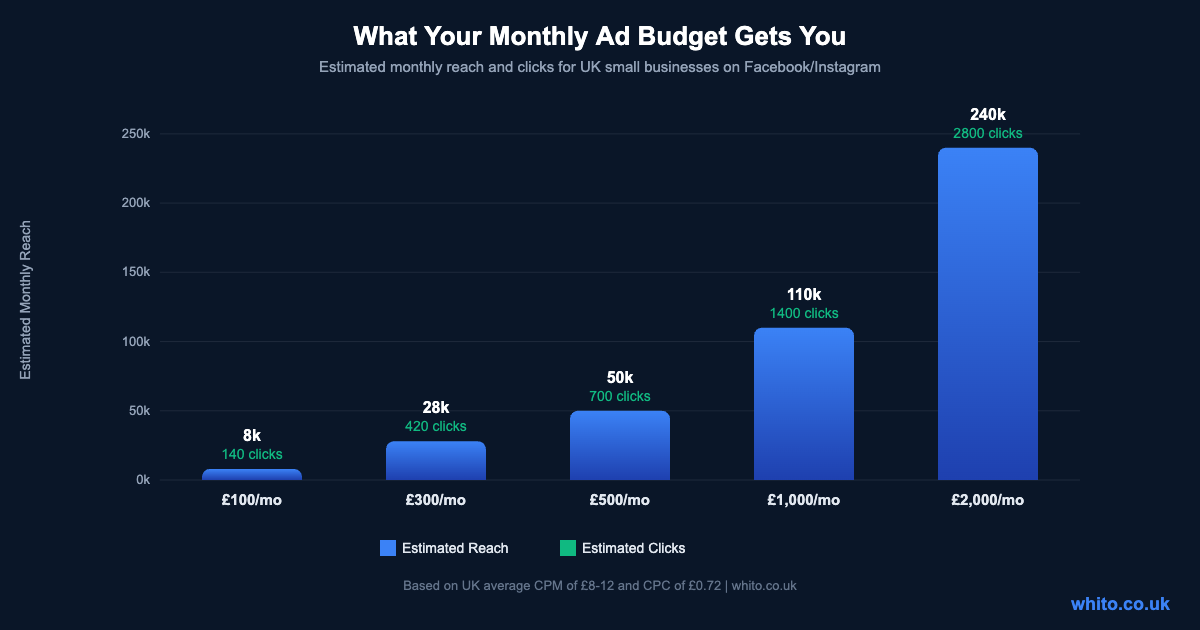
One of the biggest mistakes is spending too little and expecting too much. Meta’s algorithm needs data to optimise, and that takes volume. Here’s what different monthly budgets realistically get you in the UK.
| Monthly Budget | Daily Spend | Expected Reach | Expected Clicks | What You Can Do |
|---|---|---|---|---|
| £100 | £3.30 | 8,000 | 140 | Test one audience with one ad. Learning phase only. |
| £300 | £10 | 28,000 | 420 | Run 2-3 ad variations. Enough data to start optimising. |
| £500 | £16.50 | 50,000 | 700 | The sweet spot for most businesses. Test, learn, scale. |
| £1,000 | £33 | 110,000 | 1,400 | Multiple campaigns, retargeting, proper funnel approach. |
| £2,000+ | £65+ | 240,000+ | 2,800+ | Full funnel with prospecting, retargeting, and conversion campaigns. |
If you’re just starting, £300 per month is the minimum to get meaningful data. Below that, Meta’s algorithm doesn’t have enough conversions to optimise properly, and you’re essentially guessing.
How to target the right people
Targeting is where most small businesses either overthink or underthink. Meta’s AI has improved dramatically, so hyper-specific targeting isn’t always better. But you still need to point it in the right direction.
| Targeting Type | How It Works | Best For |
|---|---|---|
| Location | Target by city, postcode, or radius around your business | Local service businesses, restaurants, shops |
| Interest-Based | Target people who like specific pages, topics, or activities | Reaching new audiences who match your customer profile |
| Custom Audiences | Upload your email list or target website visitors | Retargeting people who already know you |
| Lookalike Audiences | Meta finds people similar to your existing customers | Scaling once you have 100+ customers or leads in a list |
| Advantage+ (AI) | Meta’s AI finds your audience automatically | When you have enough conversion data (50+ per week) |
For local businesses, start with location targeting plus one or two broad interests. A plumber in Leeds doesn’t need to target “people interested in plumbing.” Target homeowners aged 30-65 within 15 miles. Meta will figure out the rest.
Once you have the Meta Pixel collecting data and at least 100 website visitors, create a Custom Audience of those visitors and run retargeting ads. These are almost always your cheapest, highest-converting campaigns because these people already know who you are.
Setting up your first campaign (step by step)
Meta Ads Manager looks complicated, but the setup process is straightforward if you follow this order. You don’t need an agency for this. You need 30 minutes and a clear offer.
Your first campaign: 8-Step setup
- Install the Meta Pixel on your website. This tracks what visitors do after clicking your ad. Without it, you’re flying blind.
- Go to Meta Ads Manager (not the “Boost” button on your page). Navigate to business.facebook.com/adsmanager.
- Choose your objective. For leads, pick “Leads.” For website traffic, pick “Traffic.” For sales, pick “Sales.” Don’t pick “Engagement” unless you only want likes.
- Set your budget. Start with £10/day. Set an end date so you don’t forget about it.
- Define your audience. Location (your service area), age range, and 2-3 interests. Keep it broad enough that Meta shows “Audience size: 200,000+” in the estimator.
- Choose placements. Select “Advantage+ Placements” to let Meta optimise across Facebook and Instagram automatically.
- Create your ad. Upload your image or video, write your headline and description, add your URL. Use one clear call to action.
- Publish and wait. Give it 3-5 days before judging results. Meta needs time to learn who responds to your ad.
The most important thing here is the objective. If you choose “Traffic,” Meta will find people who click links (but may never buy). If you choose “Leads” or “Sales,” Meta optimises for people who actually convert. Choose the objective that matches what you want to happen.
What good ad creative looks like
Creative is the single biggest factor in whether your ads work. Not targeting, not budget, not timing. The image or video is what stops someone scrolling, and the copy is what makes them click.
Here’s what works for UK small businesses:
Images: Use real photos of your work, your team, or your product. Stock photos underperform by 30-50% compared to authentic content. If you’re a hairdresser, show actual before-and-after shots. If you’re a builder, show the finished kitchen. Phone photos are fine as long as the lighting is decent.
Video: Keep it under 30 seconds. Hook in the first 3 seconds (show the result, not the process). Add captions because most people watch without sound. Vertical format (9:16) for Stories and Reels, square (1:1) for feed.
Copy: Lead with the benefit or the problem you solve, not your business name. “Fed up with unreliable cleaners?” works better than “Smith’s Cleaning Services, established 2015.” Keep the primary text under 125 characters so it doesn’t get truncated. Include one clear call to action.
Testing: Always run 2-3 versions of your ad with different images or headlines. Let Meta show all of them, then after a week, pause the worst performers. This simple A/B testing approach can cut your cost per result by 20-40%.
Seven mistakes UK small businesses keep making
Common ad mistakes (and what to do instead)
- Boosting posts instead of running proper ads. Boosted posts have limited targeting and optimisation. Use Ads Manager for real campaigns.
- Sending traffic to the homepage. Your homepage isn’t designed to convert ad traffic. Create a dedicated landing page with one clear action.
- Targeting too narrowly. An audience of 5,000 people gives Meta nothing to work with. Aim for 200,000+ for prospecting campaigns.
- Changing ads every two days. The algorithm needs 3-7 days and 50+ conversions to leave the learning phase. Stop tinkering.
- Ignoring the Meta Pixel. Without conversion tracking, you’re guessing which ads work. Install it before you spend a penny.
- No retargeting. People who visited your website are 3-5x more likely to convert than cold audiences. Run retargeting ads from day one.
- Judging results on likes and comments. Vanity metrics don’t pay bills. Track cost per lead, cost per sale, and return on ad spend.
How to read your results
Meta Ads Manager gives you dozens of metrics. Most of them don’t matter. Here are the only numbers you need to check.
| Metric | What It Tells You | Warning Sign | What to Fix |
|---|---|---|---|
| CTR | Is your ad interesting? | Below 1% | Change your image or headline. Your ad isn’t grabbing attention. |
| CPC | Are clicks affordable? | Above £1.50 | Broaden your audience or improve your ad creative. |
| Conversion Rate | Are clicks turning into leads/sales? | Below 2% | Your landing page needs work, not your ad. |
| Cost Per Lead | How much does each lead cost? | Above £25 | Test new audiences, offers, or simplify your lead form. |
| ROAS | Are you making money? | Below 2x | Your offer or pricing may need rethinking, not just the ad. |
| Frequency | How often does the same person see your ad? | Above 3.0 | Your audience is too small or your ad has been running too long. Refresh creative. |
Check your results every 3-4 days, not every hour. If something is clearly not working after 5 days and 1,000+ impressions, change one thing at a time: the image, the headline, or the audience. Never change everything at once or you won’t know what fixed it.
When to DIY vs hire an agency
You don’t need an agency to run Facebook and Instagram ads. But there are situations where getting help makes sense.
| Factor | Do It Yourself | Hire an Agency |
|---|---|---|
| Monthly Ad Spend | Under £1,000 | £1,000+ |
| Your Time | 2-4 hours per week available | No time to learn or manage |
| Complexity | 1-2 simple campaigns | Full funnel, multiple audiences, product catalogues |
| Agency Cost | £0 | £300-£1,500/month |
| Best Approach | Learn the basics, run simple campaigns, reinvest savings | Hire when your ad spend justifies the management fee (10-20% of spend) |
If you’re spending less than £500 a month, an agency fee of £500 means you’re paying more in management than in ads. That rarely makes sense. Learn the basics yourself, run simple campaigns, and only bring in help when your spend and complexity justify it.
If you do hire someone, read our guide on how to choose a digital marketing agency. The same red flags apply: no long-term contracts, transparent reporting, and you should always own your ad account.
Getting started this week
Your first week action plan
Day 1: Set up a Meta Business Suite account and install the Meta Pixel on your website.
Day 2: Decide your offer. What’s the action you want people to take? Book a call, download a guide, buy a product, visit your shop?
Day 3: Create or choose your landing page. If you don’t have one, use a lead form ad instead (no landing page needed).
Day 4: Take 3-5 photos of your product, work, or team. Real photos outperform stock every time.
Day 5: Build your first campaign in Ads Manager. One campaign, one audience, 2-3 ad variations. Set it to £10/day with a 14-day end date.
Day 6-7: Let it run. Don’t touch anything. Check back on Day 10 to review results.
Total cost for your first test: £140. That’s enough to know whether paid social is worth pursuing for your business.
If you found this useful, these guides cover the next steps:
Email Marketing for UK Businesses covers how to capture the leads your ads generate and turn them into customers through automated email sequences.
High-Converting Landing Pages explains how to build the pages your ads send people to, so you’re not wasting clicks.
How to Choose an SEO Agency in the UK applies to any digital marketing hire, including paid social agencies. The same red flags and questions work here too.