

Last Updated on June 11, 2026
ClickUp promises a lot.
Tasks.
Docs.
Goals.
Time tracking.
Dashboards.
Automation.
The pitch is simple:
Replace multiple tools with one.
The question is:
Does consolidation create clarity.
Or complexity?
Note: Start with ClickUp List view only. Ignore Gantt charts, dashboards, and automations for the first month. Get your team comfortable with the basics before adding complexity. The number one reason teams abandon project tools is overcomplication at setup.
What ClickUp Actually Is
ClickUp is an all-in-one work management platform.
It combines:
- Task management
- Project planning
- Document storage
- Goal tracking
- Time tracking
- Basic CRM-style workflows
- Automations
It aims to centralise operations.
Not just organise tasks.
Where ClickUp Is Strong

For UK businesses scaling operations, ClickUp excels at:
- Deep customisation
- Multi-team coordination
- Advanced workflow automation
- Visibility across projects
- Structured reporting
It is powerful.
More powerful than many simpler tools.
The Customisation Advantage

ClickUp allows:
- Custom fields
- Custom statuses
- Complex workflows
- Role-based permissions
- Detailed dashboards
You can build:
Marketing systems.
Sales tracking.
Operations pipelines.
Product roadmaps.
That flexibility is its strength.
And its risk.
ClickUp in Practice: A Real UK Business Example
A Manchester-based digital marketing agency has grown to 14 staff.
Clients are increasing.
Deadlines are tighter.
Projects overlap.
They use Google Docs for briefs, Trello for tasks, Slack for communication, and spreadsheets for reporting.
Nothing is broken.
But nothing connects.
Deadlines slip quietly.
Tasks get duplicated.
No one has full visibility across accounts.
They are busy, but fragmented.
What ClickUp Shows Them
They centralise everything into one workspace.
Client projects move into structured lists.
Every task has a named owner.
Deadlines are visible across teams.
Recurring workflows are templated.
Within two weeks, the cracks appear.
One account manager is overloaded.
Design tasks are consistently the bottleneck.
Certain retainers have no clear delivery timeline.
This was not visible before.
That is not a workload issue.
It is a structural issue.
What They Do Next
They simplify.
Five clear task statuses.
Defined project templates for each service line.
One dashboard per department.
They remove unnecessary views and archive unused lists.
They enforce a weekly pipeline review.
Within 60 days:
Missed deadlines drop.
Capacity planning improves.
Client reporting becomes easier.
No heavy automation.
No complex setup.
Just discipline applied to a central system.
The Honest Caveat
ClickUp does not make teams productive.
It exposes where execution is weak and where ownership is unclear.
If leadership does not define processes first, the workspace becomes cluttered.
If standards are not enforced, usage declines.
The platform supports structure.
It does not replace it.
Pricing (UK Context)
ClickUp is competitively priced.
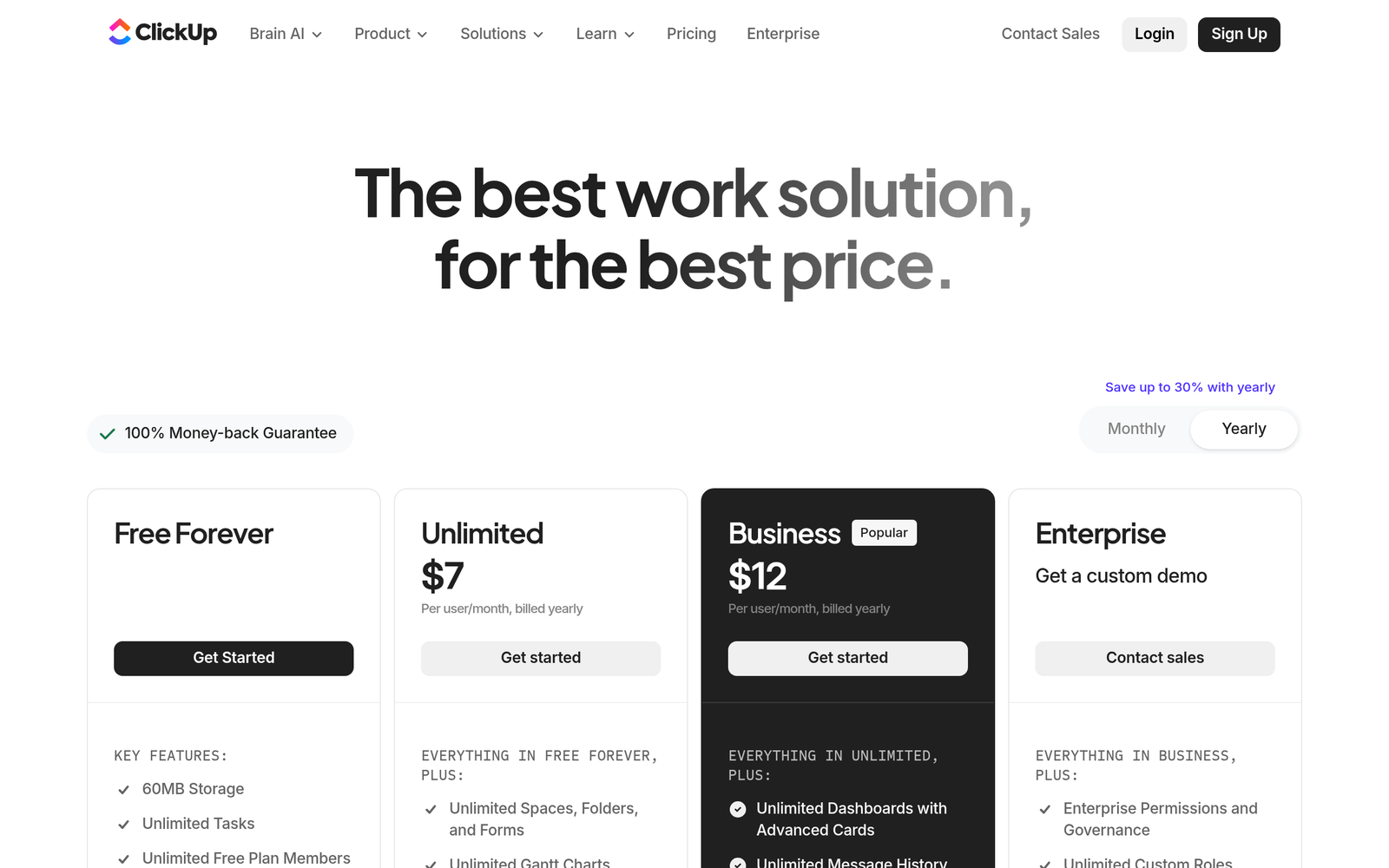
Typical tiers:
- Free plan available
- Paid plans roughly £6–£12 per user/month
- Higher tiers increase with advanced features
For the depth offered, pricing is strong.
Where ClickUp Can Become Overwhelming
Because it does so much:
- Setup can become complex
- Workspaces can become messy
- Teams may struggle with consistency
- Adoption may drop without leadership
Power requires discipline.
Without structure, ClickUp becomes clutter.
ClickUp vs Monday.com
ClickUp:
- More feature-dense
- Greater flexibility
- Stronger customisation
Monday.com:
- Cleaner interface
- Easier onboarding
- Simpler workflows
ClickUp is deeper.
Monday is often simpler.
Choice depends on team maturity.
ClickUp vs Asana
ClickUp:
- Broader feature set
- More operational depth
Asana:
- Cleaner task-focused workflow
- Simpler project management
If you want consolidation, ClickUp offers more.
If you want clarity in project tracking only, Asana may suffice.
Can ClickUp Replace Multiple Tools?
It can potentially replace:
- Basic task managers
- Internal docs systems
- Light CRM tracking
- Time tracking software
- Simple reporting tools
But it will not replace:
- Dedicated CRM platforms for sales-heavy teams
- Advanced marketing automation
- Accounting software
- Deep analytics platforms
It centralises operations.
It does not replace specialised revenue systems.
Who ClickUp Is Best For
ClickUp works well for:
- Agencies
- Marketing teams
- Growing service businesses
- Product teams
- Multi-department organisations
Especially when:
Spreadsheets are everywhere.
Tasks are missed.
Information is scattered.
The Real Scaling Question
Scaling businesses face a choice:
Add more tools.
Or build structured systems.
ClickUp supports systemisation.
But only if:
- Processes are defined first
- Workflows are mapped clearly
- Leadership enforces usage
- Simplicity is prioritised
Otherwise, it becomes another layer of complexity.
The Adoption Risk
The biggest failure pattern:
Building an overly complex workspace.
Hundreds of statuses.
Too many dashboards.
Unclear ownership.
The best ClickUp setups are:
Minimal.
Focused.
Commercially aligned.
The Whito View
ClickUp: Common Questions Before You Consolidate
Is ClickUp better than Monday.com or Asana?
It’s more feature-dense and flexible, which suits structured, scaling teams. If you want simplicity and faster onboarding, Monday.com or Asana may feel lighter.
Can ClickUp replace multiple tools?
It can replace basic task managers, internal docs, and light workflow tracking. It won’t replace specialist systems like a full CRM, marketing automation platform, or accounting software.
Note: Before switching to ClickUp, list every tool you currently use and what you actually use it for. Most businesses use 20% of their tool features. ClickUp can consolidate, but only if you are disciplined about setup. Otherwise you just move the mess to a new platform.
Is ClickUp suitable for small UK businesses?
Yes, but only if you define processes first and keep the setup simple. Without discipline, it can become cluttered and overwhelm small teams.
Does ClickUp directly improve growth?
No, it improves execution and accountability. Growth improves when the underlying strategy and processes are already clear.
See how real UK businesses do this well
Our Stolen With Pride series breaks down smart marketing moves from real UK businesses. No theory, just practical ideas you can use. See how Surreal Cereal turned LinkedIn into a free marketing channel, how Bloom & Wild’s email opt-out built more loyalty than any campaign, and more.